Multi-camera live streaming with up to three phones
One phone on the halfway line, one behind each goal. BeamBubble puts up to three cameras in one live, and every viewer picks the angle they want. No switcher, no director, no extra app.
- Up to 3 cameras
- Viewers pick the angle
- Each camera recorded
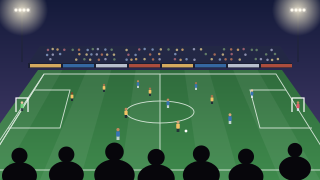
Three phones, one live, every angle
-
Go live as usual
The first phone to go live is the main camera. It's what viewers see first, and what TVs and the main video show.
-
Others add their camera
Members of the bubble who may go live tap Add your camera and give it a name viewers see, like "Behind the goal".
-
Viewers pick
A row of tiles under the player shows each camera. A tap, or a sideways swipe on the picture, switches to it.
Built for a sideline, not a studio
A main camera
Whoever is filming can make their camera main with one tap, and the owner and admins can choose any camera. If the main camera stops, another takes over.
Sound follows the picture
Viewers hear the camera they're watching, so the sound behind the goal matches the picture behind the goal.
One score for every camera
The live scoreboard is shared. Anyone filming can tap a goal, and it shows on every angle.
Camera apps count too
A camera can be a phone or a camera app: an XbotGo following the play, OBS on a laptop, or Larix on a spare phone.
Every camera recorded
When the bubble records, the main video follows the main camera, and each camera's own video is kept. On the video page, switch camera at the same moment.
Stop one, keep going
Stop ends your own camera; the others carry on. The owner and admins can stop any camera or end the live for everyone.
Where to put three phones
Put the main camera where it sees everything, then use the others for the close-ups people care about.
Soccer
Main camera high on the halfway line. One phone behind each goal for the shots and the saves.
Soccer streamingBasketball
Main camera at half court, raised. A second on the baseline under one basket, a third in the corner.
Basketball streamingWeddings
Main camera at the end of the aisle. A second at the front facing the guests, for faces during the vows.
Wedding streamingSchool concerts
Main camera in the middle of the hall. A second near the stage for close-ups of the children.
School eventsViewer's choice or a director? Both have their place
Many multi-camera streaming apps work like a TV studio. Several devices send their picture to one person, the director, who switches between them, and everyone watches the same shot. Switcher Studio, for example, builds a production from several iPhones, iPads and Macs this way (checked 17 November 2026).
That suits produced shows: a church service with a running order, a concert with a crew, a talk with slides. It needs someone free to run it.
At a youth game, nobody has a free pair of hands. So BeamBubble does it the other way: there's no director, and each viewer chooses. Grandma follows her grandson from behind the goal while the coach watches the wide view.
Good to know
- Extra cameras are people in the bubble. Use a bubble for people you invite, so members can add their phones. In a bubble for anyone with the link, the owner films.
- Switching can jump a few seconds. The main camera reaches viewers a few seconds behind live for a smooth picture; the other cameras come live, without that delay.
- Each camera uses its own data. At 1080p, every filming phone uploads about 3 GB an hour. Data use per hour.
- Three cameras at most, and up to 25 people watching at the same time.
Multi-camera questions
Can you live stream with two phones or multiple cameras?
Yes. In a BeamBubble bubble for people you invite, up to three members can film the same live, each with a phone or a camera app. The first one is the main camera; the others join with Add your camera, and viewers switch between them.
Do I need a switcher or a director for a multi-camera stream?
No. Every viewer picks their own angle, so nobody has to switch shots. If you want everyone to start on one shot, make that camera the main camera: it's what viewers see first and what TVs show.
How do viewers switch between cameras?
Under the player there's a tile for each camera, with its name. Viewers tap a tile, or swipe sideways on the picture. In full screen, the tiles come with the controls.
Which camera does the TV show?
The main camera. When a viewer sends the stream to a TV with AirPlay or Chromecast, the TV follows the main camera, also when someone makes another camera main. Watching on TV.
Can an XbotGo or OBS be one of the cameras?
Yes. Each person's camera can be their phone or a camera app that streams RTMP, such as an XbotGo, OBS Studio or Larix Broadcaster. Camera app guides.
Is every camera recorded?
When the bubble records, yes. The main video follows the main camera, as viewers saw it, and each camera's own video is kept next to it. Whoever goes live is told first that their camera is recorded. About recordings.
Your people are waiting for the link.
Make a bubble in a minute, send the link, and go live from the phone in your pocket. Viewers watch in their browser, no app needed.